

NEW AI Creative Tools: introducing the AI Image Generator & Editor
We’re closing out the year with something new: a set of AI-powered creative tools inside Zakeke.
The first one is already available in Early Access: AI Image Generator & Editor, and more AI tools are coming soon.
This update makes image creation and editing faster and simpler, all directly inside the customization flow, without jumping between tools.
Let’s dive deep!
AI Image Generator & Editor
The new AI Vectorizer is an AI-powered feature that automatically converts raster images uploaded by yThe AI Image Generator & Editor allows your customers to generate and modify images, logos, and graphics using AI, directly inside the Customizer.
Once enabled, customers can:
- Generate new images using AI
- Create graphics and logos optimized for customization
- Edit or transform existing images without re-uploading files
You can decide whether to enable the Generator, the Editor, or both, depending on your workflow.
Learn more about the new AI Image Generator & Editor
AI Generator: from prompt to image
The AI Generator includes two different generation modes, each powered by a dedicated AI agent.
The Images mode is designed for general AI-generated visuals, ideal for illustrations and creative assets.
The Graphics / Logos mode uses a specialized AI agent optimized for logos and graphic elements, delivering cleaner shapes and higher-quality results for branding and print-related use cases.
The same prompt can produce different results depending on the selected mode, giving customers more control over the final output.
When the Generator is active, a “Generate with AI” button appears directly in the Uploads panel.
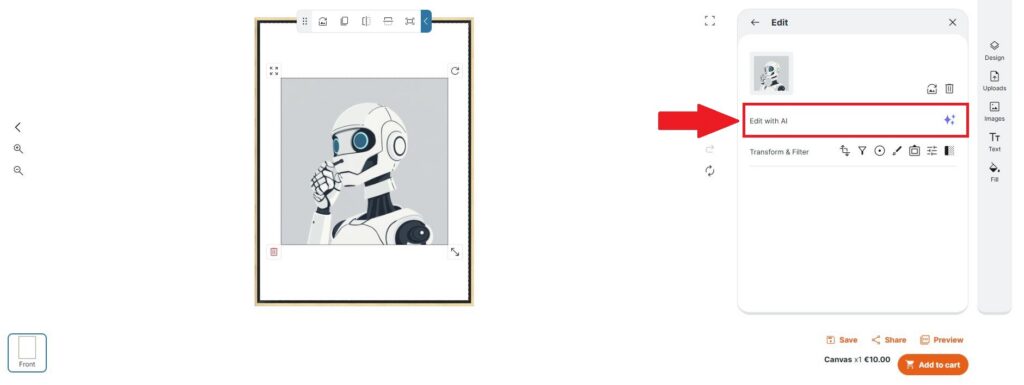
AI Editor: edit images with AI
The AI Editor allows customers to modify existing images using AI.When enabled, an “Edit with AI” button appears in the image management panel, making it easy to refine visuals directly inside the Customizer, without switching tools or workflows.
Additional improvements
For both Generator and Editor:
- You can define how many images are generated per prompt
Pre-set styles are available to speed up creation and ensure more consistent results
Coming soon: more AI Creative Tools
The AI Image Generator & Editor is just the first step.
Additional tools already in development include:
- AI Design Generator, to create full product customizations using AI
- AI Product Staging, for realistic product and lifestyle images
- AI Virtual Model, to showcase products on AI-generated models or customer-uploaded photos
And that’s our last update of the year.
The next AI tools are already in the works, so stay tuned!